
.svg)
Guide to an Ergonomic Desk Setup: Prevent Pain, Boost Productivity, and Protect Your Posture
In today’s world, most of us spend 40+ hours a week in front of computers. From college lecture halls to remote work setups to office cubicles, we’ve gradually molded our bodies around our technology—and not in a good way.
Long hours in poor posture create a recipe for:
- Neck and shoulder pain
- Headaches
- Upper and lower back pain
- Tight hips
- Carpal tunnel symptoms
These are among the most common reasons people seek help from chiropractors, physical therapists, and massage therapists each year. And while hands-on treatment absolutely helps, your desk setup can make or break your recovery.
Here’s the truth:
Never adapt your body to your workstation. Make your workstation adapt to you.
This guide will show you exactly how.
Why Ergonomics Matter More Than You Think
If you sit—or stand—with poor posture for hours at a time, your muscles eventually adapt to that position. If you spend eight hours teaching your neck, shoulders, and back to be tight and stiff, you’ll spend many more hours trying to undo the damage later.
Forward head posture = full-body compensation
Your spine works like a series of linked cogs. When one segment moves out of alignment, the others follow:
- If your head drifts forward → your neck muscles overwork
- Your mid-back begins to round
- Your lower back tucks underneath you
- Your whole body strains to hold you upright
For every inch your head moves forward, the muscles of your neck take on significantly more weight. Over time, this leads to:
- Chronic knots
- Trigger points
- Scar tissue buildup in the fascia
- Persistent stiffness
This is why good posture—and a supportive workstation—is essential, not optional.
The Essentials of a Healthy Desk Setup
Let’s break this down into practical, easy-to-fix components.
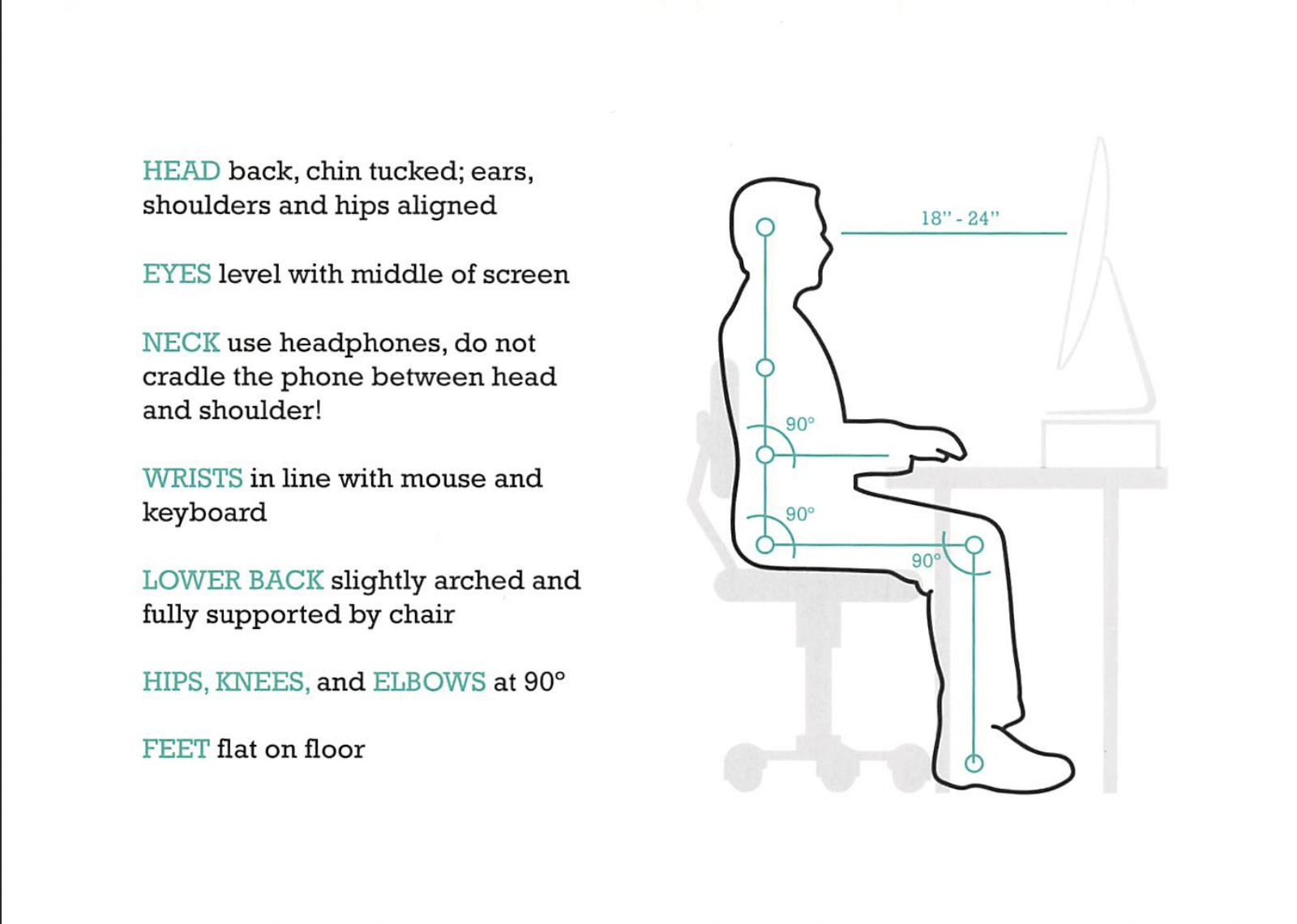
1. Posture: Ears Over Shoulders
This is your posture anchor.
When your ears sit directly over your shoulders:
- Your head’s weight is evenly distributed
- Your neck and shoulders relax
- You avoid chronic tension and headaches
When your head creeps forward, those same muscles strain to keep it from falling — like holding a bowling ball several inches in front of your body.
Quick visual:
Imagine a string lifting the crown of your head gently upward. Your ribcage stays stacked over your pelvis, and your feet stay grounded.
2. Monitor Height: Eye Level Keeps You Neutral
Your monitor should be:
- Centered directly in front of you
- With the middle to top third at eye level
This minimizes downward gaze, slouching, and upper-back strain.
Laptop user?
Get a laptop stand and use an external keyboard. Your neck will thank you.
Multiple screens?
Place them right next to each other—no gap—so your head doesn’t whip left and right all day.
3. Keyboard & Mouse: Bring Them to You
This is one of the most commonly missed adjustments.
If you have to reach even slightly:
- Your arms fatigue
- Your shoulders shrug
- You eventually lean or fall forward
- Your head shoots in front of your shoulders
Instead:
- Keep elbows at ~90°
- Shoulders relaxed
- Keyboard/mouse comfortably within reach
This one change alone fixes a massive amount of desk-related discomfort.
A Simple Trick to Maintain Good Posture
Holding optimal posture can feel tiring at first — especially if your postural muscles haven’t been used in a while.
Try this:
Use a small pillow or rolled towel behind your low back.
This immediately:
- Supports the natural curve of your spine
- Helps you sit upright without muscular effort
- Decreases mid-back rounding
- Improves neck alignment automatically
It’s the easiest way to “cheat” into better posture.
Standing Desks: Great Tools (When Used Correctly)
Standing desks can help:
- Reduce pressure on your lower back
- Ease hip flexor tension
- Improve circulation
- Break prolonged sitting habits
But two important reminders:
1. You can still slouch while standing
The same principles apply:
Ears over shoulders → shoulders relaxed → screen at eye level → keyboard close.
2. Standing all day is not ideal
Your body will tell you when it’s fatiguing:
- You shift all weight onto one leg
- You kick a hip out
- Your knees lock
- You start leaning into the desk
When this happens, sit for 5–10 minutes, reset, and stand again.
Aim for a mix of sitting and standing throughout the day.
Stretches to Reset Tight Muscles During the Workday
Here are a few quick, effective movements to reduce tension and improve mobility:
✔️ Hip Flexor Stretch
Counteracts prolonged sitting.
✔️ Thoracic “Elbows on Desk” Extension Stretch
Great for opening the chest and mid-back.
✔️ Neck Mobility Stretches
Gently move through rotation, side bending, and flexion.
✔️ Shoulder Stretch
Relieves tension in the traps and upper back.
Need Help Optimizing Your Desk or Treating Pain?
If you’re experiencing neck pain, shoulder tightness, headaches, or back pain from long hours at a computer, we can help.
At Boulder Sports Clinic, our chiropractors, physical therapists, and massage therapists provide:
- Fast, effective pain relief
- Posture and movement assessments
- Personalized ergonomic recommendations
- On-site workstation evaluations for businesses
Whether you want help for yourself or your entire office, our team can create a plan to keep you healthy and productive.
👉 Contact us today to schedule an appointment or inquire about onsite ergonomic services.
About the Author
Dr. Steve Brown, DC, MS, CCSP® is a Doctor of Chiropractic and co-owner of Boulder Sports Clinic, with over 10 years of experience treating athletes in Boulder, from professional and collegiate competitors to weekend warriors and active adults. His background includes working with movie stars, serving as a collegiate team doctor, practicing in high school athletic training rooms, and providing on-field medical coverage for tournaments, triathlons, and high school sports.
Dr. Steve specializes in sports chiropractic care, functional movement analysis, and rehabilitation-based treatment to help patients recover efficiently, prevent future injury, and return to the activities they love. As an athlete himself, he understands the demands of training and performance and brings that perspective into every treatment plan.
Related Posts

Cold Weather Running in Boulder: Preventing Hip and Hamstring Injuries This Season

Lower Back Pain Treatment in Boulder: When to See a Chiropractor

How to Fix Gluteal Tendinopathy in Runners
Experience the difference at Boulder Sports Clinic.
Contact us today to schedule an appointment and start your journey towards optimal health and peak performance. Still have questions? Call us now at (303) 444-5105
